

Analytical Instrument Software Validation and Data Integrity
Analytical instrument software controls instruments, acquires signals, creates electronic records, processes analytical data, performs calculations, applies acceptance criteria, supports review, and transfers results to other regulated systems.
Validation should demonstrate that the complete computerized analytical process performs as intended and protects data throughout its lifecycle. Installing a qualified instrument or executing a supplier’s standard software test package does not establish control of the configured laboratory system.
The validated system may include embedded instrument firmware, acquisition workstations, instrument-control applications, chromatography data systems, databases, processing methods, calculation functions, report templates, user administration, audit trails, interfaces with a laboratory information management system (LIMS) or electronic laboratory notebook (ELN), servers, network services, backup systems, and long-term record repositories.
Validation depth should be based on intended use, system complexity, configuration, electronic-record criticality, data-integrity risk, and the extent to which an incorrect or unavailable function could affect product-quality decisions.
Purpose and Validation Objectives
Analytical instrument software validation should demonstrate, as applicable, that:
- the intended use is defined and approved
- the regulated system boundary is understood
- software, hardware, infrastructure, and interfaces are identified
- the installed configuration matches the approved baseline
- electronic records and metadata are complete and attributable
- data are acquired without unauthorized alteration or loss
- processing methods are controlled and versioned
- calculations produce accurate results
- audit trails capture applicable GMP-relevant activities
- access is limited according to assigned responsibilities
- electronic signatures are linked to their records where used
- interfaces transfer complete and accurate information
- backup and restoration protect records and configurations
- failures, interruptions, and exceptions are detected
- testing demonstrates the requirements and risk controls
- supplier evidence is assessed before use
- users are trained before release
- changes are authorized, documented, tested, and approved
- periodic review confirms that the validated state remains maintained
- retirement preserves required electronic records and removes obsolete access
Software validation should be coordinated with the broader risk-based analytical instrument qualification strategy. Instrument qualification and software validation overlap but do not replace one another.
Regulatory Context
21 CFR Part 11 establishes criteria under which FDA considers electronic records and electronic signatures trustworthy, reliable, and generally equivalent to paper records and handwritten signatures.
Part 11 applicability depends on the records and signatures created or maintained under applicable predicate rules. It should not be determined only from the presence of a computer or software application.
FDA’s Part 11, Electronic Records; Electronic Signatures—Scope and Application guidance should be considered when documenting the Part 11 assessment and validation approach.
21 CFR 211.68 requires appropriate controls over computer or related systems, including authorized changes and accuracy checks appropriate to system complexity and reliability.
21 CFR 211.194 requires complete laboratory data derived from testing and records of analytical methods, calculations, results, and instrument calibration.
The FDA Data Integrity and Compliance With Drug CGMP guidance explains that each CGMP workflow performed by a computer system is an intended use that should be checked through validation, with validation depth commensurate with risk.
FDA’s computer software assurance guidance is directed specifically to medical-device production and quality-management-system software. Its risk-based concepts may be informative, but it should not be presented as the governing pharmaceutical CGMP requirement for laboratory software.
Intended Use
Validation begins with a clear description of what the software does in the regulated analytical process. The intended-use statement should identify:
- instrument or instrument family
- analytical techniques supported
- regulated laboratory activities
- instrument-control functions
- data-acquisition functions
- processing and integration functions
- calculations
- specifications and decision rules
- report generation
- review and approval
- electronic signatures
- interfaces
- record storage
- backup and retention
- applicable users and locations
For example, “chromatography software” is not an adequate intended-use statement.
A more useful definition would identify that the system controls specified HPLC and GC instruments, acquires chromatographic signals, stores raw data and metadata, applies approved processing methods, calculates results and system suitability, supports review and approval, generates controlled reports, and transfers approved results to LIMS.
Different workflows within the same software may have different risks and validation requirements.
System Boundary
The system boundary should include every component that performs, supports, or protects a regulated function. The boundary may include:
- analytical instrument
- embedded firmware
- instrument controller
- acquisition workstation
- local software
- centralized application
- database
- file server
- application server
- virtual server
- network services
- identity-management services
- time source
- print service
- report server
- LIMS or ELN interface
- archival system
- backup platform
- remote support connection
- cloud or supplier-hosted components
- administrative tools
The boundary should distinguish regulated components from external supporting services while documenting the dependencies between them.
The following illustration shows a representative analytical instrument software architecture and validated system boundary.
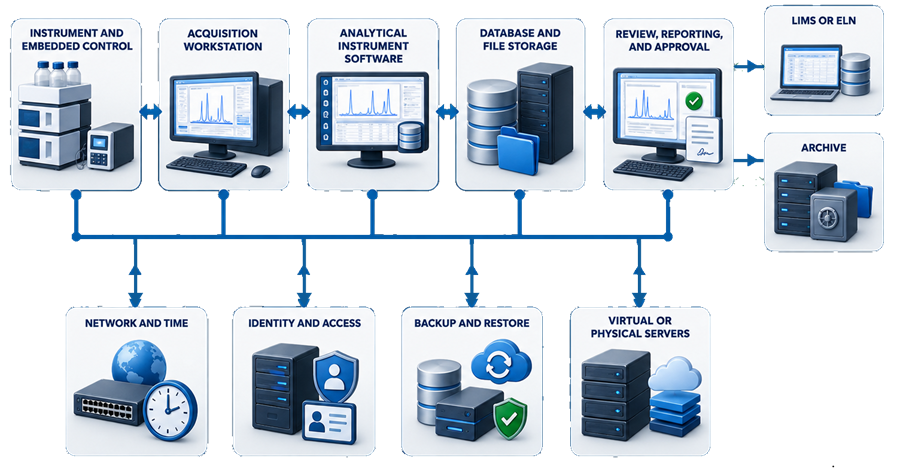
A narrow boundary that includes only the instrument workstation may omit the database, user authentication, backup, server, interface, or archive responsible for maintaining the regulated record.
An excessively broad boundary can also weaken validation by assigning unrelated enterprise infrastructure to the instrument protocol without defining specific dependencies. The boundary should be technically accurate and operationally manageable.
Architecture Documentation
Architecture documentation should show:
- physical and logical components
- data sources
- data destinations
- communication pathways
- interface direction
- storage locations
- authentication source
- time source
- backup source and destination
- remote-access pathway
- trust boundaries
- administrative responsibilities
- system ownership
- supplier-managed components
Architecture diagrams should reflect the installed system rather than a generic supplier diagram.
The documentation should identify where:
- original data are first created
- temporary data are stored
- regulated records become persistent
- processing methods are stored
- calculations are performed
- audit trails are generated
- reports are produced
- results are transferred
- records are backed up
- records are archived
- users and privileges are managed
Software Classification
Software classification supports validation planning but does not replace assessment of intended use and risk.
Analytical software may include:
| Software type | Characteristics | Validation implications |
|---|---|---|
| Embedded firmware | Controls instrument hardware and may not be user-configurable | Verify installed version, applicable functions, alarms, configuration, and instrument interaction |
| Standard commercial application | Supplier-developed functions used largely as delivered | Assess supplier evidence and test configured intended-use workflows |
| Configurable application | Uses configurable methods, calculations, reports, roles, workflows, and interfaces | Verify configuration, permissions, calculations, records, workflow, and change control |
| Custom component | Site-developed code, script, macro, driver, calculation, or interface | Apply increased design, code, testing, traceability, and maintenance controls |
| Infrastructure software | Operating system, database, virtualization, backup, identity, security, or network service | Qualify or assure the services required to support the validated application |
| End-user application | Spreadsheet, database, template, or script used to process regulated analytical data | Control formulas, versions, access, input, output, review, and retention according to risk |
The same commercial product may require different validation scope at different sites because configuration and intended use differ.
Supplier terminology or category assignments should not be accepted without evaluation of the actual installed application.
Configuration Management
The validated configuration should be documented before testing and controlled after release. Applicable configuration items include:
- software version
- firmware version
- operating-system version
- database version
- instrument drivers
- enabled modules
- licenses
- connected instruments
- instrument definitions
- communication settings
- data paths
- storage locations
- processing settings
- calculation libraries
- report templates
- user roles
- password settings
- audit-trail settings
- electronic-signature settings
- interface mappings
- backup configuration
- time synchronization
- security settings
- remote-access configuration
Configuration records may include approved specifications, configuration reports, screenshots, exports, scripts, or automatically generated inventories.
Screenshots should be used selectively. Machine-readable configuration exports are generally more useful when they are complete, controlled, and retrievable.
Electronic Records
The electronic record should be defined according to how the system performs the regulated workflow. An analytical record may include:
- sample and standard identification
- sequence or worklist
- instrument method
- acquisition parameters
- original signal
- image or spectrum
- run start and stop information
- instrument status
- system events
- processing method
- integration events
- calculations
- dilution factors
- results
- units
- specification comparison
- system-suitability assessment
- report
- review and approval
- electronic signatures
- audit trails
- associated metadata
A printed report or exported PDF may not constitute the complete record when reconstruction requires dynamic electronic data, methods, metadata, integration history, or audit trails.
The record definition should identify which components must remain linked and retrievable throughout the required retention period.
Metadata
Metadata provide the context needed to understand and reconstruct an analytical activity. Applicable metadata may include:
- date and time
- user identity
- instrument identity
- software and firmware version
- acquisition method and version
- processing method and version
- sequence
- sample position
- sample identifier
- injection or measurement number
- detector channel
- acquisition rate
- calculation parameters
- integration events
- manual changes
- approval status
- record version
- deletion or cancellation status
- audit-trail events
Metadata should be retained with the associated analytical data.
Copying only a reported result or final PDF may remove the context needed to establish how the result was generated, processed, changed, and approved.
Electronic-Record Lifecycle
The analytical record develops through sample setup, acquisition, processing, calculation, review, approval, retention, and retrieval.
The following illustration shows the principal record components and the metadata that should remain linked throughout this lifecycle.
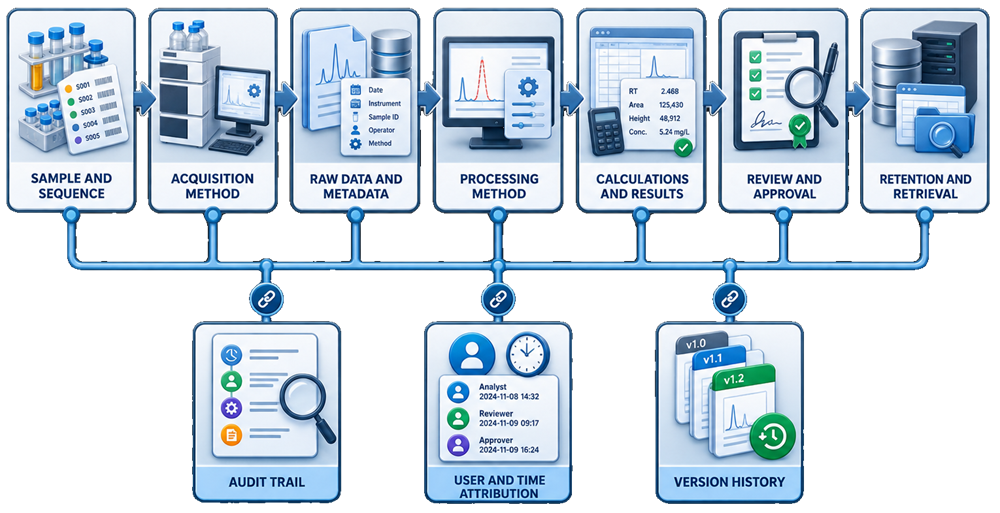
The system should preserve the relationship among:
- original data
- methods
- metadata
- calculations
- results
- audit trails
- review decisions
- approvals
- retained records
Validation should verify these relationships rather than testing individual screens without confirming the resulting record.
Raw Data
The procedure should define what constitutes raw data for each instrument type. Examples may include:
- chromatographic detector signal
- spectroscopic spectrum
- balance measurement
- dissolution readings
- titration curve
- particle-size distribution
- thermal-analysis curve
- microscopy image
- instrument status record
- original sequence
- instrument method
- metadata required to reconstruct the test
Raw data should be protected from unauthorized modification, deletion, overwriting, or exclusion.
The validation should verify how the system handles:
- incomplete runs
- aborted runs
- repeated injections
- reinjections
- invalid results
- deleted sequence entries
- communication interruptions
- temporary files
- failed record creation
- insufficient storage
- instrument shutdown
- workstation failure
The system should not silently discard unsuccessful, incomplete, or atypical analytical activities.
Processing Methods
A processing method may control:
- peak detection
- integration
- baseline assignment
- smoothing
- filtering
- spectral treatment
- blank correction
- calibration models
- curve fitting
- result selection
- calculations
- system-suitability evaluation
- report content
The validation strategy should verify:
- method creation
- method identification
- version control
- authorized modification
- approval where required
- association with data
- reprocessing
- method comparison
- historical reconstruction
- audit-trail generation
- prevention of unintended overwrite
The record should identify which processing method and version produced the reported result. An approved method should not be replaced in a manner that prevents reconstruction of previously reported analyses.
Integration and Reprocessing
Chromatographic integration and other processing changes require controlled capabilities. Testing should evaluate:
- automatic processing
- manual integration
- reintegration
- reprocessing with another approved method
- retention of original processing
- comparison of result versions
- change reason
- user attribution
- date and time
- audit-trail entry
- review and approval
- report representation
The software should not permit users to replace original results without retaining the history needed to reconstruct the change.
Procedures should define when manual integration is permitted, what justification is required, and how the change is reviewed.
Calculations
Software calculations should be verified independently.
Applicable calculations may include:
- calibration curves
- regression
- response factors
- dilution factors
- potency correction
- standard purity
- moisture correction
- averages
- relative standard deviation
- resolution
- signal-to-noise ratio
- reporting limits
- specification comparison
- rounding
- unit conversion
- pass-or-fail decisions
Testing should cover:
- correct inputs
- formula implementation
- sequence of operations
- units
- decimal precision
- rounding rules
- boundary values
- zero values
- negative values where applicable
- missing values
- invalid inputs
- result limits
- error handling
- report output
- interface output
A calculation should not be accepted solely because it produces the expected result for one routine example. Boundary conditions and failure modes should be tested according to risk.
Specifications and Decision Rules
When software applies specifications or system-suitability criteria, validation should confirm:
- correct test and product association
- correct limits
- units
- inclusive or exclusive boundaries
- rounding before or after comparison
- treatment of censored results
- treatment of below-limit values
- warning and failure behavior
- authorization to change limits
- version control
- report representation
- interface transfer
The result displayed on screen, printed on a report, and transferred to another system should remain consistent.
User Access and Security
Access should reflect job responsibilities and segregation of duties. Roles may include:
- analyst
- reviewer
- approver
- laboratory supervisor
- method developer
- system administrator
- infrastructure administrator
- service engineer
- vendor support
- read-only auditor
The access-control design should address:
- unique user accounts
- authentication
- password controls
- account approval
- role assignment
- privileged access
- account disablement
- inactive users
- failed login
- session timeout
- concurrent sessions
- emergency access
- service accounts
- shared accounts
- remote access
- periodic access review
Analysts should not routinely hold unrestricted administrative privileges over the system that creates and protects their regulated records.
Where technical limitations require elevated access, compensating controls should be documented, tested, and periodically reviewed.
Additional controls are addressed in Access Control and Electronic Signatures.
Electronic Signatures
Where electronic signatures are used, validation should verify:
- unique identity
- signature components
- signature manifestation
- meaning of the signature
- date and time
- linkage to the signed record
- prevention of signature transfer
- effect of record modification after signing
- reapproval behavior
- signature representation on reports
- signature retention
Electronic signatures should be assessed against applicable requirements in 21 CFR Part 11.
A username shown in a report header is not necessarily an electronic signature.
Audit Trails
Audit trails should capture GMP-relevant creation, modification, deletion, reprocessing, configuration, and administrative activities where applicable.
Testing should address:
- event generation
- user attribution
- date and time
- previous value
- new value
- reason for change
- record association
- configuration changes
- method changes
- result changes
- sequence changes
- account and role changes
- audit-trail security
- search and filtering
- review
- export
- retention
- readability
- time synchronization
Audit trails should not be disabled or modified by routine users.
The procedure should define which audit trails are reviewed, review frequency, reviewer responsibilities, escalation criteria, and documentation.
Additional controls are described in Audit Trails and Data Change Control.
System Time
Time is a critical metadata element. The system should control:
- time source
- time zone
- daylight-saving behavior
- synchronization frequency
- workstation and server alignment
- instrument-controller time
- authorized time changes
- failed synchronization
- audit-trail timestamps
- interface timestamps
- backup timestamps
Users should not be able to change system time in a manner that compromises record chronology.
Interfaces
Analytical software may exchange information with:
- LIMS
- ELN
- laboratory scheduling systems
- stability systems
- sample-management systems
- ERP
- reporting platforms
- data warehouses
- archive systems
- identity-management systems
Interface validation should verify:
- source and destination
- field mapping
- sample identifier
- test identifier
- method identifier
- result
- units
- decimal precision
- qualifier
- specification status
- date and time
- approval status
- complete transfer
- duplicate prevention
- rejected records
- failed transfer
- retransmission
- reconciliation
- unauthorized modification
- audit trail
- recovery after interruption
A successful normal transfer is insufficient. Failure detection and reconciliation should also be tested.
Additional interface controls are described in Analytical Instrument–LIMS Integration.
Infrastructure
Infrastructure supports the validated application and should be controlled according to its effect on regulated functions.
Applicable components include:
- physical server
- virtual server
- hypervisor
- operating system
- database
- network
- firewall
- domain services
- identity-management platform
- time service
- storage
- backup software
- endpoint protection
- remote-access service
- cloud service
Infrastructure assessment should define:
- ownership
- approved configuration
- capacity
- availability
- security
- patching
- monitoring
- backup
- recovery
- change control
- incident management
- support status
- obsolescence
Application validation should not duplicate enterprise infrastructure qualification, but it should verify that required services are available and correctly integrated.
Backup, Restoration, and Disaster Recovery
Backup is not demonstrated merely by the successful completion of a scheduled job. Validation should confirm:
- records included in backup
- configuration included in backup
- processing methods included
- audit trails included
- backup schedule
- backup monitoring
- failed-job notification
- retention
- access restrictions
- encryption where appropriate
- off-site or segregated protection
- restoration
- record readability
- metadata preservation
- application reconstruction
- recovery responsibilities
Restoration testing should use representative regulated records and confirm that relationships among data, methods, metadata, audit trails, and approvals remain intact.
Disaster-recovery testing should address the system-level recovery sequence when multiple infrastructure components are involved.
Requirements
Requirements should be specific, testable, traceable, and based on actual intended use.
They may cover:
- instrument control
- data acquisition
- sample and sequence management
- record creation
- metadata
- processing
- integration
- calculations
- specifications
- review
- approval
- reporting
- audit trails
- security
- electronic signatures
- interfaces
- backup
- restoration
- retention
- retrieval
- performance
- availability
- error handling
Requirements should distinguish:
- mandatory regulated functions
- business requirements
- technical requirements
- supplier-standard functions
- optional functions not intended for use
Functions that are installed but deliberately not used should be identified. Access or configuration should prevent unintended reliance on uncontrolled functions where practical.
Risk Assessment
The risk assessment should evaluate what could happen if a software function:
- does not operate
- operates incorrectly
- uses incorrect data
- loses data
- changes data
- permits unauthorized activity
- fails without detection
- creates an incomplete record
- transfers an incorrect result
- prevents reconstruction
- becomes unavailable
Risk factors include:
- effect on product-quality decisions
- detectability
- reliance on independent review
- record criticality
- calculation complexity
- configuration complexity
- user access
- custom code
- interface dependency
- volume of data
- automation level
- supplier maturity
- failure history
Risk controls may include:
- configuration
- access restrictions
- audit trails
- independent calculation
- review
- reconciliation
- alarms
- procedural control
- backup
- automated checks
- targeted testing
- periodic monitoring
Risk assessment should determine testing depth. It should not be used to eliminate testing without demonstrating effective controls.
Validation Planning
The validation plan should define:
- intended use
- system boundary
- regulatory applicability
- software classification
- validation approach
- roles and responsibilities
- supplier involvement
- deliverables
- risk-management method
- configuration control
- test strategy
- traceability
- deviation handling
- data migration
- training
- release criteria
- change control
- periodic review
- retirement
The plan should identify which supplier evidence will be leveraged and which site-specific activities remain necessary.
Supplier Assessment and Evidence
Supplier evidence may include:
- quality-system information
- software-development lifecycle
- requirements
- design documentation
- risk assessments
- testing summaries
- release notes
- defect lists
- installation instructions
- configuration guides
- security information
- backup recommendations
- upgrade procedures
- support arrangements
- end-of-life policy
Supplier assessment should consider:
- product maturity
- regulatory experience
- development controls
- defect management
- security practices
- change notification
- documentation quality
- service capability
- long-term support
Supplier testing may reduce duplicate execution when it is relevant, credible, and applicable. It does not replace verification of site configuration, intended-use workflows, security, records, interfaces, and infrastructure.
Installation and Configuration Verification
Installation and configuration verification should confirm:
- approved hardware
- instrument identity
- workstation identity
- server identity
- software and firmware versions
- licenses
- enabled modules
- drivers
- database
- services
- storage paths
- network connections
- interfaces
- user roles
- audit-trail settings
- time synchronization
- backup configuration
- security configuration
- controlled documentation
The installed baseline should be recorded before functional testing.
Risk-Based Functional Testing
Testing should demonstrate complete workflows rather than isolated software screens. Applicable tests include:
- normal analytical workflow
- sample and sequence creation
- instrument control
- acquisition
- raw-data creation
- metadata
- processing
- calculations
- system suitability
- report generation
- review and approval
- electronic signatures
- audit trails
- interface transfer
- backup and restoration
- record retrieval
Negative and challenge testing may address:
- unauthorized access
- prohibited role functions
- missing required data
- invalid values
- duplicate identifiers
- interrupted acquisition
- instrument disconnection
- network interruption
- database unavailability
- insufficient storage
- failed interface
- incorrect calculation input
- attempted deletion
- method overwrite
- record change after approval
- backup failure
- restore failure
- time discrepancy
Testing should use realistic roles, configurations, methods, and records.
Test Evidence
Test records should identify:
- requirement and risk addressed
- test prerequisites
- tester
- date
- system and version
- configuration
- test data
- expected result
- actual result
- objective evidence
- deviations
- retesting
- review and approval
Large collections of screenshots do not automatically constitute strong evidence. Evidence should show that the expected control operated and that the result can be independently evaluated.
Requirements Traceability
Traceability should connect:
- intended use
- regulatory requirements
- user requirements
- functional requirements
- risk controls
- configuration
- testing
- deviations
- release decision
Traceability helps identify requirements that were not tested and tests that do not address an approved requirement.
Traceability may be maintained in a matrix, validated lifecycle-management system, or another controlled form appropriate to project complexity.
Deviations
Validation deviations should document:
- expected result
- observed result
- affected requirement
- affected risk control
- immediate action
- investigation
- root cause where applicable
- correction
- retesting
- effect on other tests
- residual risk
- final disposition
Repeated test execution should not be used to conceal an initial failure.
An open deviation may be acceptable at release only when its impact, interim controls, ownership, and completion plan are documented and approved.
Data Migration
When records or configurations are migrated, validation should address:
- source and destination
- data inventory
- record selection
- metadata
- audit trails
- methods
- attachments
- signatures
- version history
- units and formats
- reconciliation
- rejected records
- transformation rules
- migration logs
- record readability
- retrieval
- retention of the source system
Migration testing should establish completeness and accuracy using a justified approach. Record counts alone may not demonstrate preservation of content and relationships.
Release
Release should occur only after:
- intended use is approved
- system boundary is documented
- requirements are approved
- risk assessment is complete
- configuration is established
- required testing is complete
- deviations are resolved or accepted
- traceability is complete
- procedures are effective
- users are trained
- backup is operational
- support arrangements are established
- data migration is accepted where applicable
- Quality approval is obtained where required
The validation summary should identify:
- executed scope
- results
- deviations
- residual risks
- limitations
- required operating controls
- approved intended use
- validated configuration
- release date
Operational Procedures
Procedures should address:
- system use
- user administration
- method creation and approval
- sequence management
- processing and integration
- audit-trail review
- backup monitoring
- restoration
- incident handling
- change control
- periodic review
- business continuity
- data retention
- retirement
Procedures should distinguish analyst, reviewer, administrator, IT, vendor, and Quality responsibilities.
Change Control
Software changes may include:
- version upgrade
- patch
- firmware change
- operating-system update
- database update
- driver change
- configuration modification
- report change
- calculation change
- role change
- audit-trail setting change
- interface change
- server migration
- virtualization change
- security change
- backup change
The impact assessment should determine:
- functions affected
- records affected
- configuration affected
- interfaces affected
- infrastructure affected
- cybersecurity implications
- supplier evidence available
- regression testing required
- data migration required
- procedural changes
- training
- rollback plan
- release requirements
Testing should be proportionate to affected and potentially affected functions.
A supplier statement that an update is backward-compatible does not eliminate the site’s responsibility to assess the installed configuration and regulated workflows.
Incident and Problem Management
Software incidents may include:
- acquisition interruption
- data loss
- incorrect result
- calculation failure
- unavailable database
- corrupt record
- failed audit trail
- unauthorized access
- interface failure
- backup failure
- application crash
- incorrect time
- report error
- configuration loss
Incident assessment should consider:
- immediate containment
- affected records
- affected methods
- affected users
- product impact
- data-integrity impact
- recurrence
- root cause
- corrective action
- revalidation or requalification
- supplier escalation
- return to service
Recurring incidents should be trended collectively.
Periodic Review
Periodic review should determine whether the system remains suitable, secure, supported, and validated. Inputs should include:
- current intended use
- current configuration
- changes
- incidents
- deviations
- failed analyses
- audit-trail findings
- user-access review
- backup failures
- restoration tests
- interface errors
- performance and capacity
- security events
- supplier notices
- open defects
- operating-system status
- software support
- obsolete components
- training
- procedural changes
Possible outcomes include:
- continued use under existing controls
- corrective action
- increased monitoring
- access remediation
- configuration correction
- targeted testing
- upgrade
- migration
- replacement
- retirement
Periodic review should not be treated as automatic repetition of the original validation.
The Analytical Instrument Periodic Review and Requalification framework should be used to determine whether review findings require no testing, targeted testing, or broader requalification.
Validation Lifecycle
Validation should continue after initial release through change control, incident management, performance review, security control, and periodic assessment.
The following illustration shows the relationship between initial validation, continued control, remediation, and retirement.
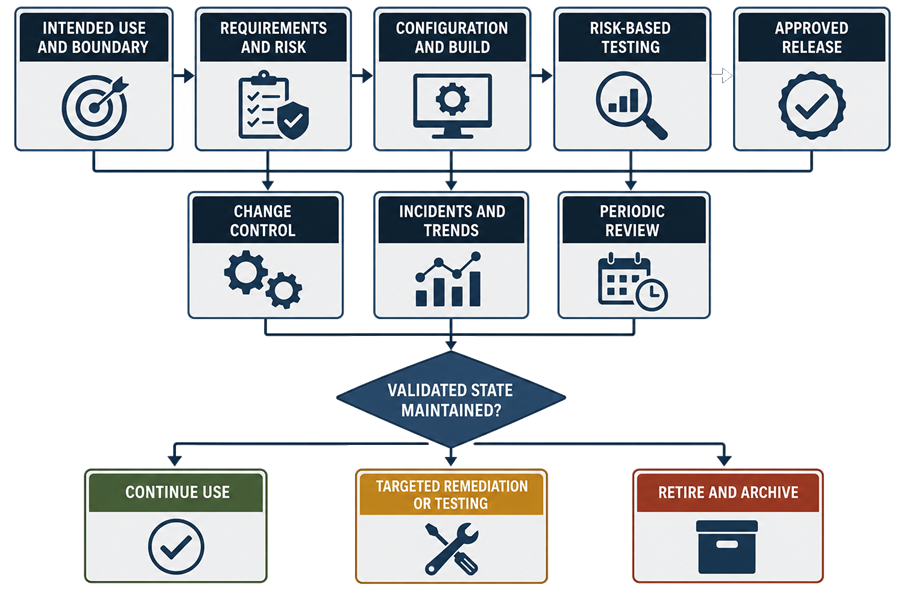
A system remains validated through controlled evidence. It does not remain validated merely because its original validation documents are still available.
Retirement
Retirement should be planned before the application or infrastructure becomes unavailable. The retirement plan should address:
- replacement system
- record inventory
- retention requirements
- data migration
- archive format
- metadata
- audit trails
- electronic signatures
- method and report versions
- record retrieval
- readability
- source-system retention
- licenses
- vendor support
- user accounts
- service accounts
- interfaces
- network access
- remote access
- backup disposition
- server disposition
- confidential information
- approval of lifecycle closure
The organization should demonstrate that retained records remain accessible and reconstructable for the required period.
Exporting reports to PDF may be inadequate when dynamic data, methods, metadata, audit trails, or processing history are required to reconstruct the analytical activity.
Common Validation Deficiencies
Common deficiencies include:
- validating software without defining its intended use
- limiting the system boundary to the workstation
- omitting servers, databases, interfaces, identity services, or backup
- relying entirely on supplier qualification
- using generic test scripts unrelated to configured workflows
- failing to define the complete electronic record
- retaining reports without raw data and metadata
- allowing shared accounts
- allowing analysts unrestricted administrative privileges
- failing to test audit trails
- failing to define audit-trail review
- failing to verify processing-method version control
- omitting independent calculation verification
- testing only successful interface transfers
- failing to test backup restoration
- failing to test interrupted acquisition
- failing to preserve incomplete or aborted runs
- uncontrolled manual integration
- overwriting previous processing results
- uncontrolled report templates
- unvalidated spreadsheets or custom calculations
- missing requirements traceability
- undocumented configuration changes
- incomplete periodic access review
- unsupported software or operating systems
- migrating record counts without verifying content and relationships
- retiring software without ensuring future record retrieval
Conclusion
Analytical instrument software validation should establish confidence in the complete regulated workflow, from instrument control and data acquisition through processing, calculation, review, reporting, transfer, retention, and retrieval.
The validation boundary should include the software, configuration, electronic records, metadata, interfaces, and infrastructure needed to perform and reconstruct the analytical activity.
Effective validation depends on defined intended use, testable requirements, risk assessment, controlled configuration, representative workflow testing, supplier assessment, traceability, documented release, change control, incident management, periodic review, and controlled retirement.
Data integrity is not a separate feature added after software validation. It is an outcome of correctly designed, tested, operated, reviewed, and maintained controls across the complete analytical record lifecycle.