

Spreadsheets and End-User Applications in GMP Operations
Spreadsheets are commonly used for calculations, data analysis, trending, reporting, and recordkeeping in pharmaceutical operations. Other end-user applications include departmental databases, scripts, macros, statistical files, and low-code tools developed outside a formal software-development process.
These tools are not automatically GMP systems. Their control requirements depend on how they are used.
A spreadsheet used to schedule meetings does not require GMP validation. A spreadsheet used to calculate assay results, evaluate validation data, determine equipment acceptance, or support batch release may require rigorous control and verification.
The objective is to ensure that each GxP end-user application:
- has an approved intended use;
- performs its calculations correctly;
- protects formulas and reference data;
- restricts inappropriate changes;
- uses an approved version;
- produces reviewable records;
- remains controlled throughout its lifecycle; and
- is replaced when spreadsheet controls are no longer adequate.
What Is an End-User Application?
An end-user application is a tool created or substantially configured by business users to support a specific task.
Examples include:
- calculation spreadsheets;
- controlled templates;
- macro-enabled workbooks;
- laboratory data-analysis files;
- engineering calculation tools;
- validation-data analysis workbooks;
- departmental databases;
- scripts;
- statistical-analysis files;
- reporting tools; and
- low-code applications.
The commercial spreadsheet program is only the platform. The user-developed formulas, lookup tables, macros, scripts, data connections, and reports constitute the application that must be assessed.
Intended Use and GxP Applicability
The assessment should begin with a concise intended-use statement describing:
- the process supported;
- the users;
- the required inputs;
- the calculations or transformations;
- the outputs;
- the decisions supported; and
- the authoritative record location.
For example:
The approved workbook is used by Quality Control analysts to enter replicate assay results, calculate the mean and relative standard deviation, compare the result with the approved specification, and generate a calculation report for inclusion in the laboratory record.
A spreadsheet is GxP-relevant when it performs a regulated function or creates, processes, reports, transfers, or retains information used for a GMP decision.
Typical GxP uses include:
- calculating laboratory results;
- evaluating specifications;
- calculating yield;
- calculating potency, concentration, or dilution;
- evaluating validation acceptance criteria;
- trending environmental-monitoring data;
- analyzing process capability;
- determining equipment acceptance;
- generating product-quality reports; and
- supporting batch disposition.
The assessment should also identify the authoritative record. This may be the completed workbook, a controlled electronic report, a laboratory record, or information transferred into another validated system.
Printing a spreadsheet does not automatically eliminate the significance of the electronic file. Formulas, hidden data, metadata, macros, and intermediate calculations may be necessary to understand or reconstruct the reported result.
For drug-manufacturing operations, 21 CFR 211.68 requires appropriate controls over computer systems and risk-based checking of input and output accuracy.
Risk Classification
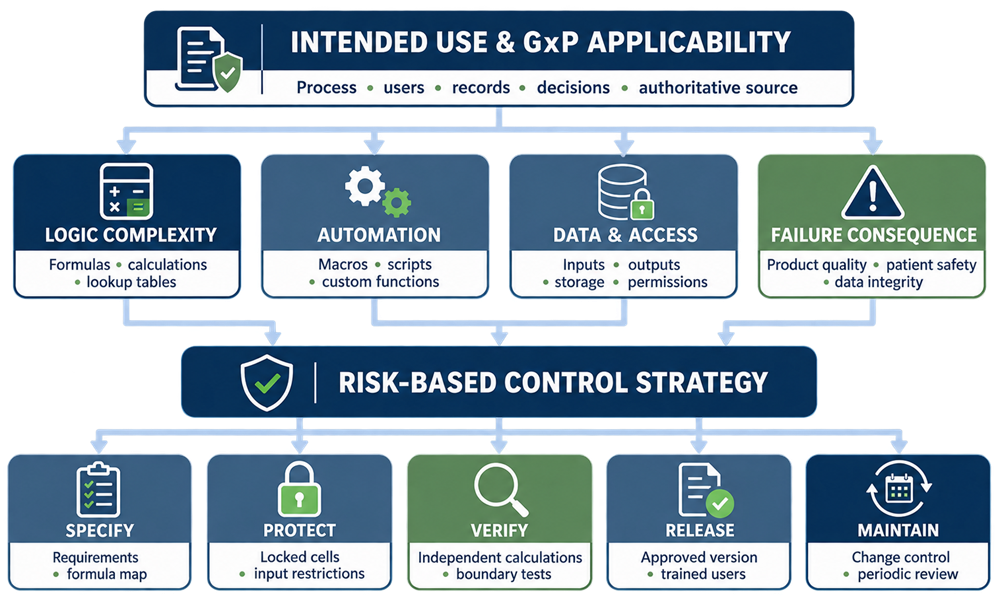
Risk classification should determine how much specification, testing, protection, and lifecycle control are required. The assessment should consider five factors:
| Factor | Principal question |
|---|---|
| Intended use | What regulated process or decision depends on the application? |
| Failure consequence | What could happen if the result is incorrect? |
| Logic complexity | Does it contain formulas, lookup tables, macros, scripts, or external links? |
| Detectability | Would an independent control identify an error before the result is used? |
| Operational exposure | How many users, records, departments, or locations depend on it? |
A practical classification model may distinguish among the following levels.
Supporting or Low-Risk Application
Typical characteristics include:
- no product-quality decision;
- simple organization or presentation of information;
- no critical calculations;
- results independently confirmed elsewhere; and
- limited GxP record significance.
Controls may consist of documented intended use, appropriate storage, version identification, and review.
Controlled Calculation or Template
Typical characteristics include:
- defined formulas;
- controlled inputs;
- limited users;
- predictable outputs;
- no macros or complex automation;
- and independent verification of results.
Controls normally include requirements, formula review, calculation verification, locked formulas, input restrictions, testing, approval, version control, and change control.
Complex or High-Risk End-User Application
Typical characteristics include:
- critical product or quality decisions;
- extensive formulas;
- macros or scripts;
- lookup tables;
- imported data;
- external connections;
- numerous users;
- frequent changes;
- or significant auditability requirements.
Controls may require detailed requirements, formula mapping, code review, comprehensive testing, traceability, restricted developer access, controlled release, periodic review, and a replacement plan.
The classification rationale is more important than the category name. A small spreadsheet performing one critical release calculation may require stronger controls than a large workbook used only for administrative reporting.
Application Design and Configuration
The workbook should be designed so users can distinguish clearly among:
- instructions;
- input cells;
- calculated cells;
- reference data;
- warnings;
- and final results.
Consistent formatting may be used to identify these areas, but color should not be the only means of distinction.
The application should avoid unnecessary complexity. Formulas should be understandable, traceable, and consistent. Obsolete worksheets, unused macros, unexplained constants, broken links, and hidden data should be removed before release.
Formulas and Calculations
Formulas should be reviewed for mathematical and scientific correctness. The review should address:
- cell references;
- copied formulas;
- absolute and relative references;
- constants;
- units;
- rounding;
- significant figures;
- conditional logic;
- blank values;
- zero values;
- error handling;
- and dependencies between worksheets.
Common spreadsheet errors include:
- formulas that omit rows or columns;
- inconsistent formulas within a calculation range;
- overwritten formulas;
- incorrect references;
- hard-coded values;
- premature rounding;
- hidden intermediate calculations;
- and incorrect pass/fail logic.
Constants should be traceable to an approved source. Specification limits, conversion factors, and other controlled values should not be embedded throughout the workbook without explanation.
Independent Calculation Verification
Critical calculations should be verified through a method independent of the spreadsheet’s formula. Verification may use:
- a hand calculation;
- an independently developed calculation;
- a verified calculator;
- qualified statistical software;
- an approved reference dataset; or
- comparison with a validated system.
Copying the same spreadsheet formula into another cell is not independent verification.
Verification should include representative normal cases and relevant challenge conditions, such as:
- minimum and maximum inputs;
- values at acceptance limits;
- values immediately above and below limits;
- zero and blank inputs;
- invalid entries;
- rounding boundaries; and
- conditions expected to produce a warning or error.
Macros, Scripts, and Custom Functions
Macros and scripts can modify data, execute calculations, import files, generate reports, or connect to other systems. They should be treated as custom software components. Controls should address:
- intended function;
- source code;
- inputs and outputs;
- external dependencies;
- error handling;
- access to files or networks;
- developer;
- version;
- and change history.
Risk-based code review should look for:
- incorrect logic;
- hard-coded file paths;
- embedded credentials;
- incomplete error handling;
- incorrect variable use;
- unauthorized data changes;
- and suppressed errors.
Testing should confirm the output and failure behavior of each critical macro or script. Successful execution without an error message does not prove that the result is correct.
Lookup Tables and Reference Data
Lookup tables may contain specifications, product codes, conversion factors, equipment limits, or acceptance criteria. Each table should have:
- an identified source;
- an owner;
- approved values;
- defined units;
- version control;
- protection from unauthorized change; and
- verification of lookup behavior.
Testing should include:
- valid entries;
- missing entries;
- duplicate entries;
- values outside the table range;
- and incorrect or unsorted reference data.
Externally maintained tables should be treated as controlled dependencies. A change to the source table may affect results even when the spreadsheet file has not changed.
Locked Cells and Input Restrictions
Cells containing formulas, constants, lookup tables, and controlled instructions should be protected against routine modification. Controls may include:
- locked cells;
- protected worksheets;
- protected workbook structure;
- restricted hidden sheets;
- read-only templates; and
- repository permissions.
Cell locking reduces accidental modification but should not be treated as a strong security boundary. Higher-risk applications also require controlled storage and restricted developer access.
Input controls may restrict:
- data type;
- acceptable range;
- date format;
- permitted list values;
- required entries;
- and duplicate values.
Input restrictions should be tested. Copying and pasting can bypass some spreadsheet validation rules, so this behavior should be challenged where relevant.
Templates, Records, and Version Control
The approved template and the completed record should be controlled separately.
The approved template contains the validated formulas, structure, instructions, and reference data. The completed file contains data associated with a specific GMP activity. The procedure should define:
- where users obtain the approved template;
- how working copies are created;
- how the template version is identified;
- where completed records are stored;
- how records are reviewed and approved;
- and how corrections are documented.
Each approved template should display:
- application title;
- unique identifier;
- version number;
- effective date; and
- approval status.
Names such as Final.xlxs, Final2.xlsx, and Final-Revised.xlsx do not provide adequate version control.
When a new version is released, the obsolete template should be removed from routine use. Existing completed records should remain linked to the version used to create them.
User Access and Storage
Access should distinguish between users who enter data and individuals authorized to modify formulas, macros, lookup tables, or workbook structure. Depending on risk, roles may include:
- application owner;
- developer;
- administrator;
- routine user;
- reviewer; and
- approver.
Approved templates and completed records should be stored in controlled locations with appropriate:
- access permissions;
- backup;
- retention;
- recovery;
- deletion control;
- and version management.
Local drives, personal cloud storage, email attachments, and uncontrolled shared folders should not be the primary storage location for critical GMP spreadsheets.
Auditability Limitations
General-purpose spreadsheets frequently lack secure, computer-generated audit trails. Typical limitations include:
- changes without reliable user attribution;
- loss of previous values;
- limited formula-change history;
- uncontrolled copies;
- editable timestamps;
- overwritten records;
- and inability to distinguish template changes from record entries.
Repository or cloud version history may help, but it should be evaluated to determine whether it:
- identifies individual users;
- captures the required changes;
- retains previous versions;
- cannot be disabled by ordinary users;
- remains available for the required retention period;
- and can be reviewed and exported.
Version history does not necessarily record every change made within a workbook between saved versions.
Where audit-trail, electronic-signature, access-control, or record-finalization requirements cannot be addressed adequately, the spreadsheet should be replaced with a more controlled application.
FDA’s Data Integrity and Compliance With Drug CGMP guidance describes expectations for maintaining complete, consistent, and accurate GMP data.
Validation and Testing
Testing should demonstrate that the application performs its approved intended use. The depth of testing should reflect risk and complexity.
| Application feature | Expected verification |
|---|---|
| Formulas | Independent calculation and formula review |
| Input fields | Valid, invalid, blank, minimum, maximum, and boundary values |
| Lookup tables | Valid, missing, duplicate, and out-of-range entries |
| Pass/fail logic | Values below, at, and above acceptance limits |
| Rounding | Values near rounding boundaries |
| Locked cells | Attempted modification by a routine user |
| Macros and scripts | Functional, error-handling, and failure-condition testing |
| External links | Correct source, successful refresh, broken connection, and stale-data handling |
| Reports | Content, units, precision, completeness, and traceability |
| Storage | Save, retrieve, access, backup, and restoration where applicable |
Testing records should identify:
- test objective;
- input;
- expected result;
- actual result;
- evidence;
- tester;
- date; and
- discrepancy disposition.
A concise protocol may be sufficient for a simple calculation. A complex macro-enabled application may require separate requirements, code review, detailed testing, and traceability.
Review and Approved Release
The reviewer should confirm more than whether the final answer appears reasonable. Review should address, as applicable:
- correct template version;
- agreement with source data;
- complete inputs;
- units;
- calculation results;
- specification comparison;
- warnings;
- overwritten formulas;
- and unauthorized structural changes.
The application should be approved for use only after:
- intended use and GxP applicability are documented;
- risk is assessed;
- requirements are defined;
- formulas and code are reviewed;
- testing is completed;
- discrepancies are resolved;
- protection is enabled;
- access and storage are established;
- procedures are effective;
- and users are trained.
The release record should identify the exact version approved for use.
Change Control and Periodic Review
Changes to formulas, macros, lookup tables, acceptance criteria, external links, protection, reports, or intended use should be assessed before implementation. The change record should determine:
- affected requirements;
- affected calculations;
- required regression testing;
- impact on existing records;
- required version change;
- procedure updates;
- and user training.
Periodic review should confirm that:
- intended use remains current;
- the owner and users remain appropriate;
- the approved version is in use;
- formulas and links remain intact;
- lookup tables remain current;
- access remains appropriate;
- incidents and errors have been assessed;
- the file remains compatible with supported software;
- and spreadsheet controls remain adequate.
Review frequency should reflect risk, use, change frequency, and previous performance.
When to Replace a Spreadsheet
A spreadsheet should be replaced when its risks cannot be managed reliably through proportionate spreadsheet controls. Replacement indicators include:
- critical product or batch decisions;
- complex formulas that are difficult to review;
- extensive macros or scripts;
- many users or locations;
- frequent changes;
- large data volumes;
- repeated copying or transcription;
- multiple interfaces;
- automated data acquisition;
- complex approval workflows;
- need for secure audit trails;
- need for electronic signatures;
- need for granular access control;
- recurring formula errors;
- inability to prevent uncontrolled copies;
- and dependence on a single developer.
No single characteristic automatically requires replacement. The decision should be based on whether the required controls are reliable, sustainable, and appropriate for the application’s risk.
Migration and Retirement
When a spreadsheet is replaced, the migration plan should address:
- source records;
- data mapping;
- formulas and business rules;
- data transformation;
- reconciliation;
- exception handling;
- validation of the replacement application;
- cutover;
- historical-record retention;
- and spreadsheet retirement.
Migration should not transfer obsolete formulas or incorrect assumptions into the new application without review.
At retirement:
- the spreadsheet should be removed from approved use;
- obsolete templates should be disabled or clearly marked;
- local and shared copies should be addressed;
- external links should be discontinued;
- the inventory should be updated;
- and required historical records should remain protected and readable.
Practical Control Strategy
A proportionate spreadsheet-validation process should answer these questions:
- What is the approved intended use?
- Is the application GxP-relevant?
- What could happen if it fails?
- Which formulas, tables, macros, or scripts require control?
- How will calculations be independently verified?
- How will users, versions, storage, and changes be controlled?
- What evidence is required before release?
- How will continued suitability be reviewed?
- When should the spreadsheet be replaced?
The control strategy should follow intended use and risk—not the number of worksheets, formulas, or cells.